
Connect Slack notifications
Send survey event notifications to your Slack workspace in real time.
Connect QuestionPunk to Slack with an incoming webhook URL. You can send notifications when responses are completed, responses are started, surveys are published or unpublished, or response limits are reached.
Before you start
Create an incoming webhook in your Slack workspace first. Keep the webhook URL ready before you open the Slack card in QuestionPunk.
Steps
Open Settings > Integrations
Go to Settings > Integrations and find the Slack card.Paste your Slack webhook URL
Create an incoming webhook in your Slack workspace through Slack app settings. Paste that URL into QuestionPunk.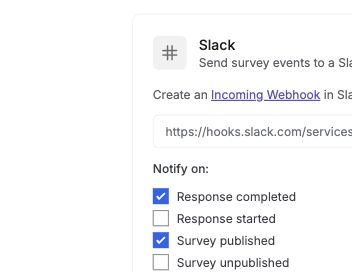
English interface · Demo study. Use the controls described in this step.
Choose notification events
Select which events send Slack notifications: Response completed, Response started, Survey published, Survey unpublished, or Response limit reached.Save the connection and test it
Save the connection. Then click Test to send a test notification and confirm it arrives. You can edit events or disconnect at any time.
The Slack integration sends real-time notifications to a Slack channel when survey events happen. This helps your team stay updated without leaving Slack.
Five event types are supported: response completed, response started, survey published, survey unpublished, and response limit reached.
After you save the integration, use Test to confirm messages go to the correct channel.
To disconnect, click Disconnect on the Slack card in Settings > Integrations.
Check the result
The Slack card should be saved with your selected events, and a test notification should appear in the Slack channel connected to the webhook.
If something goes wrong
If the test message does not arrive, check that you pasted the full incoming webhook URL into the Slack card and saved the connection first.