
Connect Google Sheets
Send completed survey responses to a Google Sheet automatically.
Connect your Google account to QuestionPunk. Then link a spreadsheet to each survey. Each completed response is added as a new row.
Before you start
Sign in to the Google account that owns the spreadsheet or can access it. Decide which survey should send responses to which sheet tab.
Steps
Open Settings > Integrations
Go to Settings > Integrations and find the Google Sheets card.Connect your Google account
Click Connect Google Account. Authorize QuestionPunk to access your Google Sheets. Your Google email appears after the connection is complete.Connect a sheet for each survey
Open the survey’s Settings > Integrations. Choose a spreadsheet from Google Drive or paste its URL. Set the tab name. Then click Connect Sheet. Each completed response is added as one row: timestamp, response ID, survey title, then each question and answer.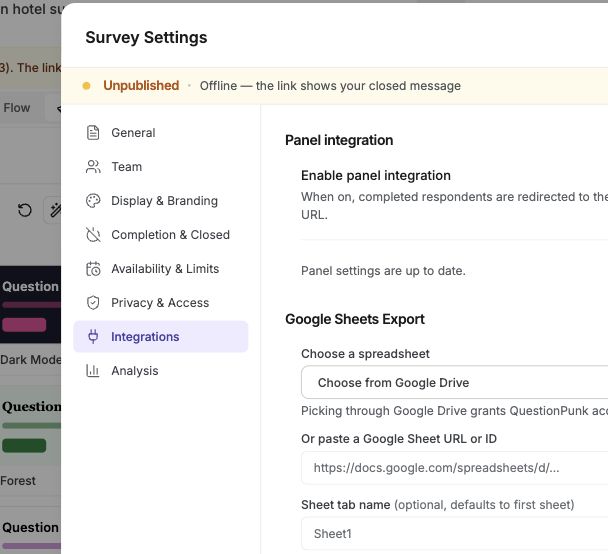
English interface · Demo study. Use the controls described in this step.
Disconnect the integration if needed
Click Disconnect on the Google Sheets card to revoke access at any time.
Use the Google Sheets integration to avoid manual CSV exports. New completed responses are added to your spreadsheet as they arrive.
Connect with your Google account. No API keys or webhook setup is required.
This works well for teams that use Google Sheets for live dashboards, shared analysis, or stakeholder reporting.
Check the result
Your Google account shows as connected, and the survey is linked to a spreadsheet tab. New completed responses should appear there as new rows.
If something goes wrong
If you cannot link a sheet, check that you connected the correct Google account and that the spreadsheet URL points to a Google Sheets file you can access.