
Reduce IP and location data collection (anonymous mode)
Stop collecting respondents' IP addresses and IP-based location for a study.
Turn on Minimize IP and location data to stop QuestionPunk from collecting respondents' IP addresses and IP-based location for a study from that point forward. It does not remove data collected earlier.
Before you start
Open the survey you want to update. Make sure you can access Settings > Privacy & Access for that survey.
Review privacy and response limits
A walkthrough using the English interface and demo content. English audio with AI-generated narration; English and Japanese captions are available.
Download videoRead the video transcript
Open Survey settings, then Privacy and Access. Minimize IP and location data reduces collection; it does not remove identifying questions. Open Availability and Limits to review response limits and opening or closing dates. Check the timezone as well as the date. Review the publication confirmation before going live. Test the participant link and closed message after you publish.
Steps
Open survey settings
Open the survey's Settings > Privacy & Access.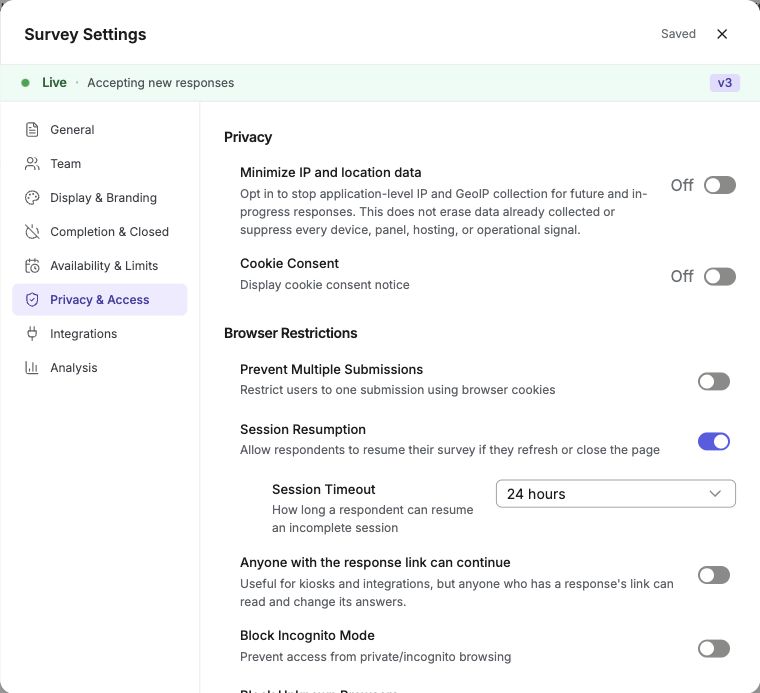
English interface · Demo study. Use the controls described in this step.
Turn on Minimize IP and location data
Under Privacy, turn on Minimize IP and location data. It is off by default and applies per survey. For new and in-progress responses, QuestionPunk stops recording IP addresses and IP-based location. It also removes IP-based fields from piping and AI prompts. Tracking pixels are disabled when the study page loads with this setting enabled. Pages that are already open must reload.Review other privacy and access settings
Check cookie consent and session resumption. You can also block incognito browsers, restrict unknown browsers, and prevent multiple submissions from the same browser.
Use this setting when your study should not keep respondents' IP addresses or locations.
Responses do not store IP addresses or IP-based location. Device type, operating system, browser, browser language, and URL parameters are still recorded with the answers.
You can combine this setting with other privacy controls, such as disabling session resumption and enabling cookie consent prompts.
Additional access controls include blocking incognito or private browsers, restricting unknown browser types, and preventing multiple submissions from the same browser. Session resumption can use a custom time-to-live (TTL, from 1 hour to 7 days) so respondents can return and finish a survey within a set window.
Settings also let you choose where your survey can be taken: Web & Android app (the default), Android app only (Android visitors are asked to continue in the app; iOS and desktop respondents still answer on the web), or Web only.
Check the result
The survey saves new responses without IP addresses or IP-based location. Existing open study pages need a reload before the change applies there.
If something goes wrong
If IP-based fields still appear in testing, reload any study pages that were already open before you turned on Minimize IP and location data.