
Keep and export survey data
Export a copy, delete responses or your account, and check retention requirements.
Use this guide to keep a checked export and find the deletion controls. For contractual retention periods or data-handling requirements, consult the current privacy notice and your agreement, or contact support.
Before you start
Make sure you can access the survey and its Results section. If you need local records, decide whether Excel or CSV fits your archival process.
Steps
Understand how data is stored
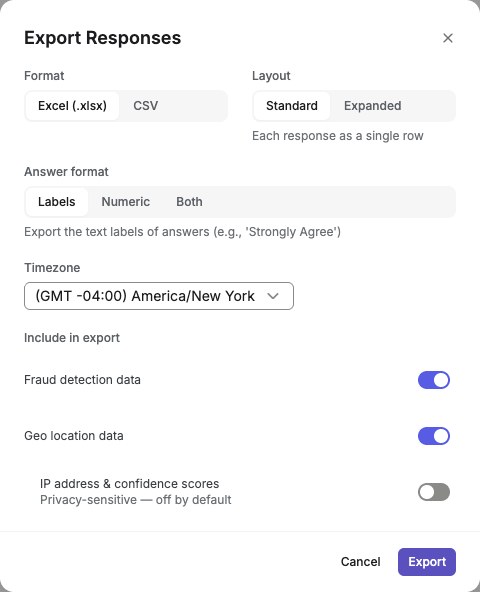
Open Results and check the active filters and response count. Every plan shows all its responses, so the filters decide what an export holds. Showing a response is not a retention policy; check your research requirements before making an archive.Export data for archival
Use the export features (Excel or CSV for responses) to save local copies of your data for long-term archival or compliance requirements.English interface · Export setup for 24 fictional demo responses. Review the included fields before downloading.
Choose the appropriate deletion control
For one response, open Results > Responses, select the response, open its menu, and choose Delete response. Review the confirmation carefully. To close your whole account, go to Settings > Account Preferences > Delete account. The confirmation covers your account, surveys, and collected responses. Export and check any records you are authorized to keep before confirming; account deletion is final.
Details and limitations
Keep exports only in locations approved for your research. Check the downloaded population: status, quality, response type, date, revision, and wave filters apply, but respondent-code and answer-content filters do not. See export filter coverage. An export is a separate copy; deleting the original does not remove downloaded files or data already delivered to another system.
This guide does not promise indefinite storage, immediate removal from backups, or a custom retention schedule. Check the privacy notice and your agreement for applicable terms. If deletion is blocked by retained panel recruitment, submission, or payout history, contact support about the record and the message shown. Active QuestionPunk Panel members must withdraw before deleting their account.
Cloud copies are separate records. Turning off Copy new files pauses future copies. Stop copying leaves files already copied in your storage. Deleting a QuestionPunk response does not establish that those external copies were deleted; manage them in the destination according to your research requirements.
Check the result
You have a checked export or have located the appropriate deletion control, and know where to confirm your retention requirements.
If something goes wrong
If rows are missing, review the filters. If deletion fails, keep the error message and contact support; do not assume the record was deleted.