
Set up a diary study
Set up recurring survey waves, track participants, and monitor completion across a longitudinal study.
Diary studies let you schedule repeating survey waves over days or weeks, enroll participants with unique smart links, and track completion in a visual compliance grid. Use them for longitudinal research, daily journaling studies, and multi-wave experience sampling.
Before you start
Decide which survey should run on each day or week. If you plan to use intake or exit surveys, make sure they are different from each other and from every wave survey. Plan how each participant will be identified, for example with an email, Prolific ID, or participant ID. Completing a plain anonymous link does not enroll someone in the diary study.
Steps
Create the diary study
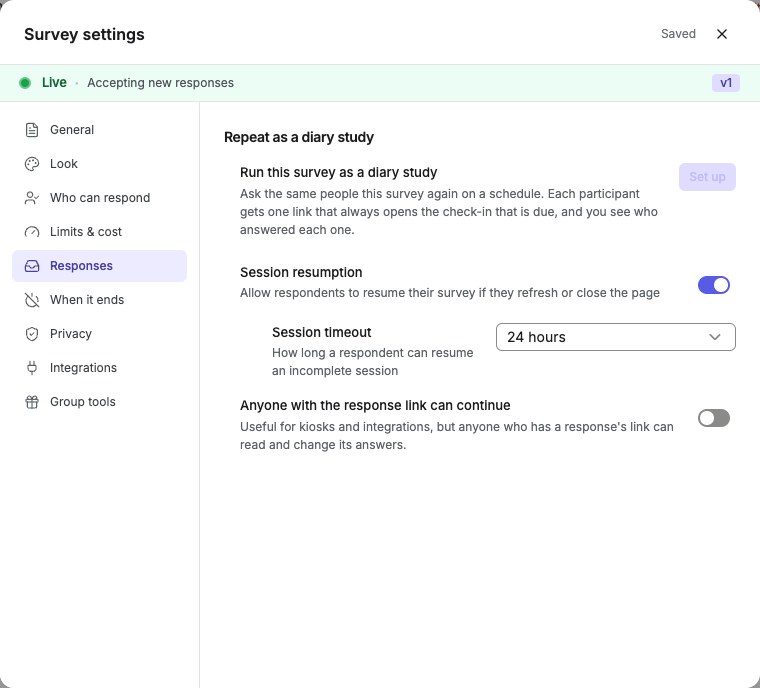
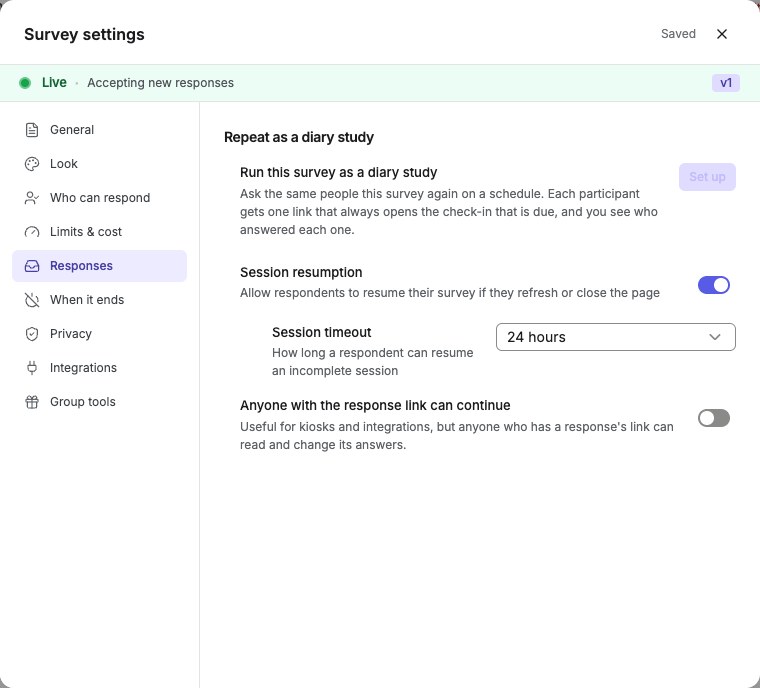
Open Survey settings → Responses and turn on Repeated responses (diary study). Configure the entry limit, minimum interval between entries, study window, Respondent links (unique?r=TOKENURLs per participant), and Response emails (automated reminder and confirmation emails).English interface · Survey settings → Responses tab showing longitudinal and diary study options.
Set the schedule
Choose the cadence: daily or weekly. Set Check-ins open at. Optionally set a deadline time. Set the study timezone. On a shared calendar, set a Start date, or leave it empty to open each wave by hand. Choose how to handle late entries: Flag as late to accept late responses with a marker, or Reject after the deadline to block submissions after the deadline.Activate the study and share the first link
A new study starts as a draft and does not enroll anyone. Click Activate on the study page. Then share the intake survey link, or the first wave survey link if there is no intake. Participants are automatically enrolled when they complete the intake survey, or the first wave survey if no intake is configured. There is no manual enrollment step. Enrollment requires an identified respondent; anonymous completions are not enrolled.Share each participant’s smart link for later waves
After a participant completes the intake survey or first wave, a unique smart link (/d/<token>) is created for that participant. Copy it from the compliance grid and share it with that person. The smart link stays the same for the whole study. It routes the participant to the current wave, the exit survey, or a between-waves message as needed. Smart links work on the web and in the QuestionPunk mobile respondent app, where participants can also track enrolled studies and due check-ins.Monitor compliance
Use the compliance grid to review a participant-by-wave matrix. Each cell shows a status: Completed (green), Late (amber), In progress (blue), Missed (red), Due now (outlined), or Not due yet (gray). The Done so far column shows the share of due waves each participant has completed. Wave statuses appear as colored badges: scheduled, open, and closed. You can close any wave. On a shared calendar, you can also open a wave.Review participant completion history
Open the study detail page to review each participant’s completion history across all waves. The compliance grid shows who completed each wave and their overall completion rate.
Details and limitations
Diary studies work well for longitudinal research such as daily journaling, experience sampling, habit tracking, and multi-wave evaluations where the same participants respond over time. Set up a diary study from the survey editor at Settings > Responses > Repeat as a diary study.
Each day in the study gets its own survey assignment from a day-by-day calendar, with up to 60 days. In many studies, the same survey repeats every day. Choose it once and it fills the remaining calendar. Change only the days that should ask something different. You can also add an optional intake survey for baseline data, demographics, or consent before day 1, and an optional exit survey for final reflections or an overall assessment after the last day. Both must be different from each other and from every day’s survey.
Once the study is active, participants are automatically enrolled when they complete the intake survey, or the first wave if there is no intake. Each enrolled participant gets a unique smart link (/d/<token>) that stays the same for the rest of the study. The link routes to the current wave, the exit survey, or a waiting page between waves, so participants do not need a new link after enrollment. The first completion must carry a participant identity. Anonymous completions do not create a participant smart link.
The compliance grid gives you a quick view of who completed each wave. The color-coded cells help you spot missed or late waves. The Done so far column shows each participant’s completion record for waves that are already due.
Wave scheduling supports daily or weekly cadence with timezone-aware timing. Set an open time and an optional deadline to define each wave’s response window. The study detail page polls every 30 seconds to keep statuses current.
By default, each participant gets a personal wave calendar based on when they enrolled. This lets staggered or batched recruitment still give each participant the full study. Someone who joins a week late is not measured against another participant’s earlier wave dates. Switch to a shared calendar instead if you want everyone on the same wave dates no matter when they joined. In that setup, a late joiner starts on the current wave and misses earlier ones.
Completion bonus tracking: You can set an optional per-study bonus amount in USD, up to $1,000, for participants who complete every wave. The compliance grid tracks eligibility automatically. Each participant appears as Eligible, Not eligible, or On track. Pay the bonus through your panel provider or your usual compensation process. QuestionPunk tracks who earned it, but does not disburse payments directly.
Scheduled Prolific batches: Connect your own Prolific API key in Settings. After activating the diary and enrolling participants, use Prolific batches > Set up batch. Choose a workspace and project, select enrolled participants, review every check-in and wrap-up window, and approve a spending limit and submission policy. Each batch has its own full calendar. Prolific bills your account directly; QuestionPunk charges no fee and deducts no credits. Verified automatic approvals require a completed response matching the participant, Prolific study and session. Pause, reschedule and cancel remain pending until Prolific confirms them. Automation must be enabled for your environment; if unavailable, the card explains this. Closing the diary still allows existing submissions to finish approval review.
Check the result
You should have an active diary study with a schedule, a first link to share, and participant smart links appearing in the compliance grid after enrollment.
If something goes wrong
If a participant is missing from the compliance grid, check that the study is active, their intake or first-wave response is completed, and that response includes a participant identity.