
Run another wave of the same survey
Use Run again to group responses into collection periods and keep your link. A new QuestionPunk Panel sample for a wave is requested the same way as the first.
Before you start
You need edit access and at least one completed response. This workflow applies to one survey. Surveys linked to a diary study use their diary schedule instead. To recruit a new QuestionPunk Panel sample for a wave, you send a request from Share > Recruit participants.
Steps
Open Run again
Open the survey’s Results and choose Run again. On first use, earlier responses become wave 1 and you create wave 2. This does not duplicate the survey.Name the wave and choose its start
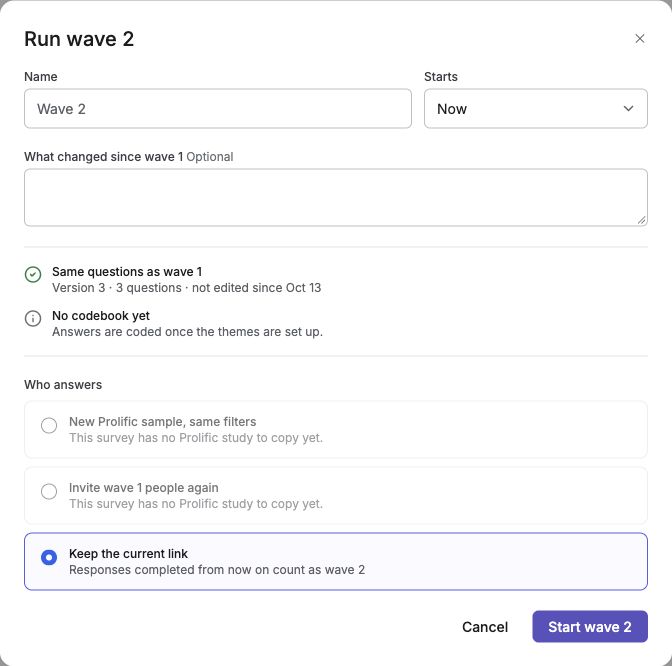
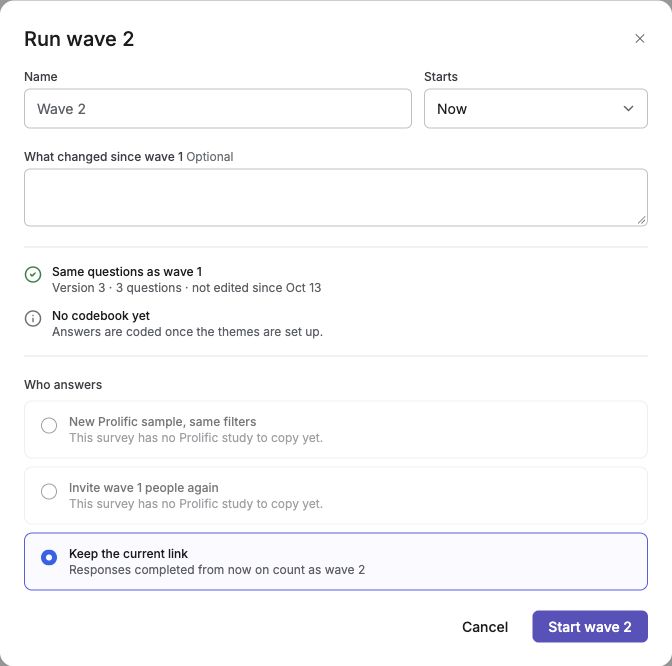
In Run wave N, optionally enter a Name and What changed since wave N−1. Under Starts, choose Now or At an earlier time. The earlier time uses your local timezone and must follow the previous wave’s start. This control cannot schedule a future wave.Review comparability
Read the question and codebook comparison before proceeding. Changed or removed questions can make waves difficult to compare even if the dialog allows you to continue. Keep a note of the change and compare only measures that remain meaningful.Choose who answers
Under Who answers, choose Keep the current link and then Start wave N to keep collecting through the same link. Do this even if the wave needs a new QuestionPunk Panel sample; you request the sample in the next step.English interface · Example setup before starting a wave, with Keep the current link selected.
Request a new QuestionPunk Panel sample
If the wave needs new panel participants, open Share, then Recruit participants, and send a request the same way as for the first sample: who you need, how many, and what they will do. Say that it is a new wave of an earlier study. We email you a quote and start recruiting once you approve it.Select and compare waves in Results
When there are at least two waves, the wave strip shows their dates and counts. Select a wave to apply its date window to Results; select it again to show all waves. Changing waves replaces the date filter. Check the other response filters before interpreting counts or exporting results.
Details and limitations
Completed responses belong to a wave by completion time. Someone who starts before a boundary and finishes after it belongs to the later wave. In exports, an incomplete response falls back to its creation time.
Editors can use Edit wave N to rename a wave or change its notes. Starts after wave 1 can move only between their neighboring boundaries. Moving a boundary changes which responses belong to each wave.
Only the latest wave can be removed. Remove wave requires confirmation and returns its responses to the preceding wave; it does not delete responses. Removing wave 2 returns to a single ungrouped run.
In a request for a new wave, say whether the sample should leave out people who answered earlier waves or invite them back. The quote confirms what is possible.
Check the result
The new wave appears in Results and your existing survey link still works. Confirm the boundary, filters, and counts before making comparisons.
If something goes wrong
If Run again is missing, check edit access and diary linkage. If no response is completed, collect one first. For unexpected counts, check completion times, filters, and the wave boundary.