
Schedule a survey to open and close automatically
Set dates and times for a survey to start and stop accepting responses automatically.
Choose an open date and a close date for your survey. The survey will begin and end response collection automatically at those times. This is useful for time-sensitive research, course evaluations, and event feedback.
Before you start
Make sure the survey is ready to publish and that you know the date, time, and timezone you want to use. You will set scheduling in Survey settings.
Review privacy and response limits
A walkthrough using the English interface and demo content. English audio with AI-generated narration; English and Japanese captions are available.
Download videoRead the video transcript
Open Survey settings, then Privacy and Access. Minimize IP and location data reduces collection; it does not remove identifying questions. Open Availability and Limits to review response limits and opening or closing dates. Check the timezone as well as the date. Review the publication confirmation before going live. Test the participant link and closed message after you publish.
Steps
Open Survey settings
Open the survey's Survey settings > Availability & Limits. Find Schedule Open Date and Schedule Close Date.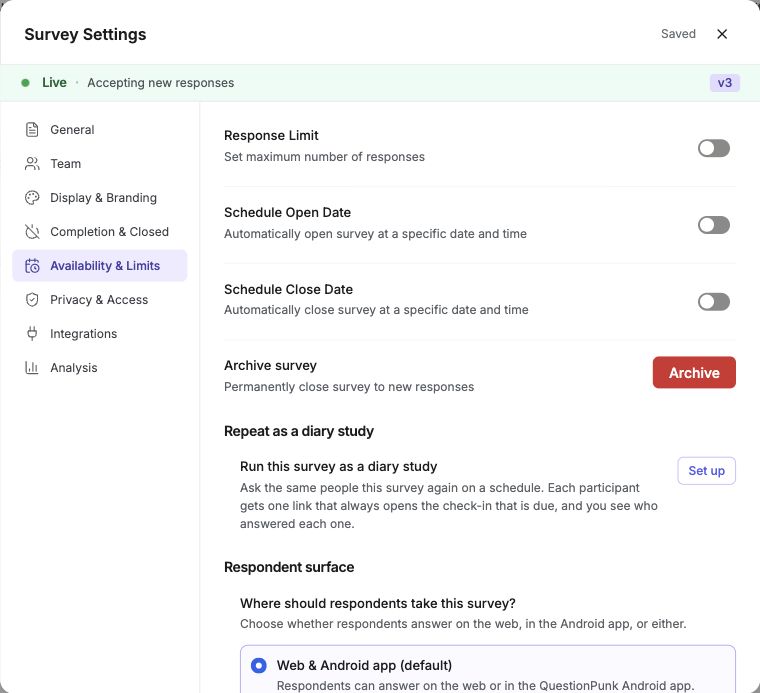
English interface · Demo study. Use the controls described in this step.
Set the open date
Choose the date, time, and timezone for the survey to start accepting responses. The survey opens automatically at the scheduled time.Set the close date
Choose the date, time, and timezone for the survey to stop accepting responses. After that time, the survey link shows a closed message.Publish the survey
Publish the survey after you enable scheduling. Even after it is published, the survey will not accept responses until the open date.
Scheduling lets you prepare and share your survey link ahead of time while controlling exactly when responses are accepted.
You can set a timezone for both the open date and the close date, so you can schedule for any region regardless of where you are.
You can combine scheduling with response limits to cap the number of submissions during your collection window.
Other useful settings: turn on the Progress Bar (Display & Branding) so respondents know how far they are, set a Redirect URL (Completion & Closed) to send respondents to a custom page after finishing, configure Cookie Consent (Privacy & Access) when required by your organization, set an AI budget cap (Availability & Limits) to limit AI credit spend, add tracking pixels (Integrations) to fire conversion events to ad platforms, and choose where respondents take the survey: on the web, in the Android app, or either.
Check the result
The survey shows scheduled open and close dates, and it only accepts responses during that time window after you publish it.
If something goes wrong
If the survey is not opening or closing when expected, check the timezone on both the open date and close date in Survey settings > Availability & Limits.